
What Is WhatsApp for Business?
WhatsApp for Business refers to using WhatsApp's official business tools — the WhatsApp Business App or the WhatsApp Business API — to communicate with customers, automate responses, send marketing campaigns, and manage customer relationships at scale.
In 2026, WhatsApp is the primary customer communication channel for B2C businesses in over 120 countries. With 3 billion+ monthly active users, 95–98% message open rates, and a platform customers already use daily — WhatsApp for Business isn't an optional channel. It's become the channel where transactions, support, and customer relationships happen in real time.
But "WhatsApp for Business" means different things depending on the size and needs of your business. Below, we break down every option, what each one does, and how to choose the right approach for yours.
WhatsApp for Business: 3 Options Explained
1. WhatsApp Business App (Free)
The free WhatsApp Business App is designed for small businesses and solo operators. It lets you:
- Create a business profile with address, hours, and website
- Set automated greeting and away messages
- Use quick replies for common questions
- Organise conversations with labels
- View basic messaging metrics
Limitation: One device, one user. No shared team inbox. No bulk messaging. No chatbot. No API integration. This breaks down the moment your business receives more than 20–30 messages per day or has more than one person handling customer queries.
2. WhatsApp Business API (for growing & enterprise businesses)
The WhatsApp Business API is the official Meta gateway that removes the limitations of the free app. With the API, businesses can:
- Multiple agents on one WhatsApp number via a shared team inbox
- Bulk messaging — send template messages to thousands of opted-in contacts (broadcast campaigns)
- AI chatbot integration — automate first-response, FAQ handling, lead qualification, and appointment booking
- System integrations — connect WhatsApp to your CRM, e-commerce platform, help desk, or ERP via API
- Interactive message types — buttons, lists, quick replies, and media messages
- Analytics — open rates, click rates, response times, and agent performance
The API requires a Meta-approved Business Solution Provider (BSP) to access. TextNow is a Meta-approved BSP — which means you get API access, shared inbox, AI chatbot, and campaign tools all in one platform, without needing to manage the technical infrastructure yourself.
3. WhatsApp Cloud API (self-hosted)
The WhatsApp Cloud API is Meta's self-hosted version — technically identical to the Business API, but accessed directly from Meta's cloud infrastructure rather than through a BSP. This is for businesses with in-house engineering teams who want to build custom integrations directly. Most businesses opt for a BSP platform like TextNow instead — it delivers the same API capabilities without the technical overhead.
| Feature | Free Business App | Business API (via TextNow) |
|---|---|---|
| Team inbox (multi-agent) | ❌ Single user only | ✅ Unlimited agents |
| Bulk broadcast campaigns | ❌ Not supported | ✅ Unlimited (opted-in contacts) |
| AI chatbot | ❌ Basic auto-reply only | ✅ Full NLU / knowledge base AI |
| CRM / system integration | ❌ | ✅ Via API or native integrations |
| Contact management | Basic labels | ✅ Full CRM with tags, fields, pipeline |
| Analytics | Basic read receipts | ✅ Full open/click/response analytics |
| Monthly cost | Free | Subscription (Meta conversation fees apply) |
WhatsApp for Business: 8 Key Use Cases
1. Customer Support Automation
Deploy an AI chatbot on WhatsApp to handle FAQs, order status queries, returns, account queries, and appointment scheduling — 24/7 without an agent. Typical deployments resolve 70–85% of inbound volume automatically. Human agents focus on escalations, complaints, and high-value customers.
2. WhatsApp Marketing Campaigns
Send segmented broadcast messages to opted-in contact lists — product launches, flash sales, re-engagement campaigns, and seasonal promotions. WhatsApp broadcast campaigns achieve 95%+ open rates and 3–5× higher click-through than email. See our WhatsApp Marketing guide for campaign strategy and compliance requirements.
3. Order and Booking Confirmations
Trigger automated WhatsApp messages at key customer journey events: order confirmed, payment received, shipment dispatched, out for delivery, delivered. For service businesses: appointment confirmed, reminder (24h before), and post-appointment follow-up. These automated touchpoints reduce inbound status queries by 50–70%.
4. Lead Qualification and Sales Automation
Capture leads from Facebook, Instagram, and web forms into a WhatsApp conversation flow. An AI bot qualifies lead intent (budget, timeline, requirements) and routes hot leads to the right sales agent with full qualification data prepopulated. No lead goes cold — automated follow-up sequences re-engage every contact.
5. WhatsApp CRM and Contact Management
Manage your full customer database from WhatsApp — with contact profiles, custom fields, pipeline stages, and conversation history. Use a WhatsApp CRM platform to track every customer across their entire lifecycle — from first inquiry through repeat purchase.
6. Appointment and Reminder Sequences
Healthcare providers, salons, consultants, and service businesses use WhatsApp appointment flows to reduce no-shows by 35–50%. Automated sequences send booking confirmation immediately, a reminder 48h before, and a final reminder 2h before — with one-tap reschedule option.
7. Post-Purchase and Retention Flows
After a customer makes a purchase, trigger a structured WhatsApp sequence: delivery update → product tip → satisfaction check-in → review request → cross-sell recommendation. These sequences increase repeat purchase rate by 20–35% compared to customers who receive no post-purchase communication.
8. Team Inbox for Shared Customer Communication
Replace individual agent phones with a shared WhatsApp inbox where every team member sees every conversation. Assign conversations, leave internal notes, and use SLA tracking — all without the customer knowing how many people are behind the account.
WhatsApp for Business Compliance: What You Need to Know
Before sending any marketing messages on WhatsApp, businesses must comply with Meta's WhatsApp Business Policy and obtain proper consent:
- Explicit opt-in required — you cannot message people who haven't opted in. Opt-in must be via a clear mechanism (web form, in-app checkbox, verbal with record, etc.)
- Template messages — outbound messages initiated by the business (outside a 24-hour customer-initiated window) must use pre-approved message templates
- Opt-out mechanism — every broadcast must include an option for contacts to unsubscribe, and those requests must be processed immediately
- No prohibited content — alcohol, gambling, tobacco, illegal products, and adult content cannot be promoted via WhatsApp Business API
TextNow handles template approval, compliance monitoring, and opt-out management automatically — so your team focuses on content and campaigns rather than policy administration.
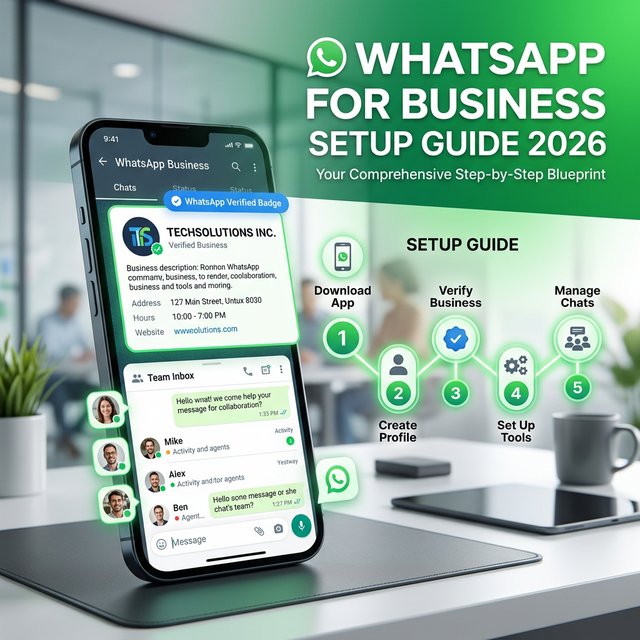
How to Set Up WhatsApp for Business with TextNow: 5 Steps
- Apply for WhatsApp Business API access. Register your business with TextNow, submit your Facebook Business Manager verification, and connect your business phone number to the API. TextNow manages the entire verification and onboarding process — typically 2–7 business days.
- Set up your WhatsApp Business Profile. Add your business name, description, address, website, and category. Create your brand profile — this is what customers see when they open a conversation with your WhatsApp number.
- Configure your team inbox. Invite agents, set up assignment rules (round-robin, skill-based, or team-based), and configure SLA targets. Every agent accesses the same number from their own login — no phone handoffs.
- Build and deploy your AI chatbot. Use TextNow's AI Studio to create your first WhatsApp bot — configure FAQ handling, lead qualification flows, and escalation triggers. Most first deployments go live within 1–3 days.
- Create message templates and launch campaigns. Submit your first message templates for Meta approval (24–48h), build your opted-in contact list, and schedule your first broadcast campaign. Monitor open rates, replies, and conversions in the analytics dashboard.
Ready to get started? Start a free trial or book a demo with our team.
Your competitors are already automating. Are you?
Every hour your team spends switching between messaging apps is an hour not spent closing deals or solving problems. TextNow puts WhatsApp Instagram Email and every channel in one place - with AI that qualifies leads and answers questions while you sleep.
No credit card required · 14-day free trial · Cancel anytime